Controls assignments
In addition to default control assignments, our aircraft is using custom variables and events to manage all its systems.
Custom variables are called L Vars (prefixed with “L:”) and custom events are called H Events (prefixed with “H:”).
If you have external hardware and you are using specific software like FSUIPC or SPAD, you can assign buttons or switches to those variables and events.
In order to see custom variables related to the aircraft, you need to enable Developer mode (general options) and go to Tools > Behaviors > Local Variables on top menu bar. All custom variables are prefixed with “AZP_C160” keyword.
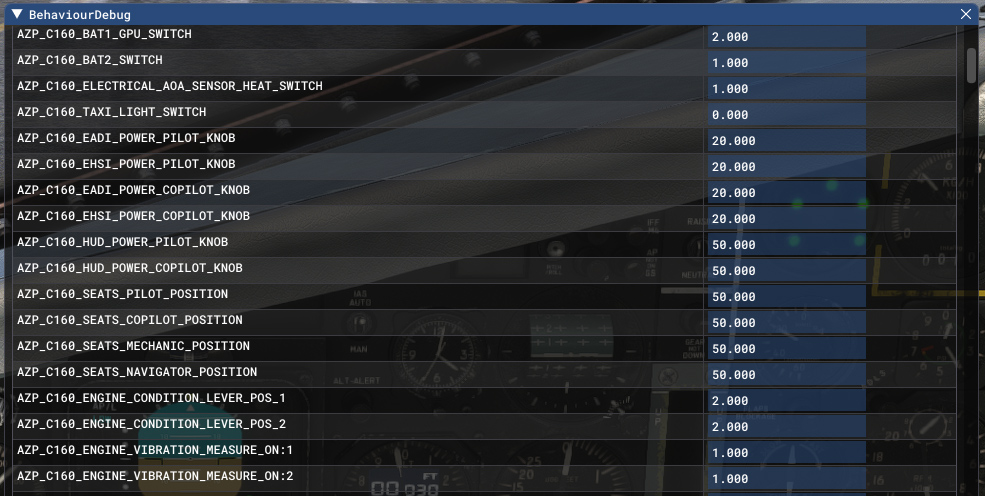
However, changing those L VARS is not always enough and you may need to call the events described in the next section.
Custom events
Here is non-exhaustive list of main H Events that you can use in order to interact with aircraft systems.
| NAME | H EVENT | DESCRIPTION |
|---|---|---|
| EFB display | AZP_C160_TOGGLE_EFB_POWER | Display or hide EFB tablet |
| EFB position | AZP_C160_TOGGLE_EFB_POSITION | Switch between the two EFB positions |
| Chocks display | AZP_C160_TOGGLE_CHOCKS | Display or hide wheel chocks |
| Covers display | AZP_C160_TOGGLE_COVERS | Display or hide aircraft covers |
| Yoke display | AZP_C160_TOGGLE_YOKE_DISPLAY | Display or hide pilot's yoke |
| General engine starting switch | AZP_C160_ENGINE_GENERAL_STARTER_ZERO AZP_C160_ENGINE_GENERAL_STARTER_VENTILATION AZP_C160_ENGINE_GENERAL_STARTER_ON | Set general engine starting switch position |
| Engine starter switch | AZP_C160_ENGINE_LEFT_STARTER_ZERO AZP_C160_ENGINE_LEFT_STARTER_ON AZP_C160_ENGINE_LEFT_STARTER_RESTARTING AZP_C160_ENGINE_RIGHT_STARTER_ZERO AZP_C160_ENGINE_RIGHT_STARTER_ON AZP_C160_ENGINE_RIGHT_STARTER_RESTARTING | Set engine starter switch (left and right engine) position |
| APU air inlet switch | AZP_C160_GTG_AIR_INLET_TOGGLE | Toggle APU air inlet |
| APU starter switch | AZP_C160_GTG_START_TOGGLE | Toggle APU starter |
| Electricity source 1 knob | AZP_C160_SOURCE1_GPU AZP_C160_SOURCE1_OFF AZP_C160_SOURCE1_BAT1 | Set electricity source 1 knob position |
| Electricity source 2 knob | AZP_C160_SOURCE2_OFF AZP_C160_SOURCE2_ON | Set electricity source 2 knob position |
| Generators knobs | AZP_C160_G1_KNOB_OFF AZP_C160_G1_KNOB_ON AZP_C160_G2_KNOB_OFF AZP_C160_G2_KNOB_ON AZP_C160_G3_KNOB_OFF AZP_C160_G3_KNOB_ON AZP_C160_G4_KNOB_OFF AZP_C160_G4_KNOB_ON AZP_C160_G5_KNOB_OFF AZP_C160_G5_KNOB_ON | Set position for each generator |
| Fuel shutoff handles | AZP_C160_FUEL_SHUTOFF_LEFT_TOGGLE AZP_C160_FUEL_SHUTOFF_RIGHT_TOGGLE | Toggle emergency fuel shutoff (left and right engine) |
| Wipers knobs | AZP_C160_WIPER_PILOT_PARK AZP_C160_WIPER_PILOT_OFF AZP_C160_WIPER_PILOT_FAST AZP_C160_WIPER_PILOT_SLOW AZP_C160_WIPER_COPILOT_PARK AZP_C160_WIPER_COPILOT_OFF AZP_C160_WIPER_COPILOT_FAST AZP_C160_WIPER_COPILOT_SLOW | Set wiper knob position for pilot and copilot |
| IRS power knob | AZP_C160_IRS_1_OFF AZP_C160_IRS_1_NAV AZP_C160_IRS_1_ATT AZP_C160_IRS_2_OFF AZP_C160_IRS_2_NAV AZP_C160_IRS_2_ATT | Set IRS power knob position (IRS1 and IRS2) |
| IFF power knob | AZP_C160_IFF_POWER_KNOB_OFF AZP_C160_IFF_POWER_KNOB_STBY AZP_C160_IFF_POWER_KNOB_NORM AZP_C160_IFF_POWER_KNOB_EMER | Set IFF (transponder) power knob position |
| IFF keyboard | AZP_C160_IFF_DIGIT_0 AZP_C160_IFF_DIGIT_1 AZP_C160_IFF_DIGIT_2 AZP_C160_IFF_DIGIT_3 AZP_C160_IFF_DIGIT_4 AZP_C160_IFF_DIGIT_5 AZP_C160_IFF_DIGIT_6 AZP_C160_IFF_DIGIT_7 AZP_C160_IFF_CLR | Events to type a new transponder code |
| EADI decision height knob | AZP_C160_DSP_DECISION_HEIGHT_INC_#INDEX# | Change decision height on EADI. #INDEX# should be replaced by 1 or 2 to alter pilot or copilot side |
| EHSI chronometer functions | AZP_C160_DSP_CHRONO_START_STOP_#INDEX# AZP_C160_DSP_CHRONO_RESET_#INDEX# AZP_C160_DSP_CHRONO_INC_#INDEX# AZP_C160_DSP_CHRONO_DEC_#INDEX# | Use chronometer functions: start/stop, reset, increase/decrease countdown. #INDEX# should be replaced by 1 or 2 to alter pilot or copilot side |
| EHSI CRS toggle button | AZP_C160_DSP_CRS_SEL_TOGGLE_#INDEX# | Toggle active CRS (1 or 2). #INDEX# should be replaced by 1 or 2 to alter pilot or copilot side |
| EHSI CRS setting knob | AZP_C160_DSP_CRS_INC_#INDEX# AZP_C160_DSP_CRS_DEC_#INDEX# | Increase or decrease CRS. #INDEX# should be replaced by 1 or 2 to alter pilot or copilot side |
| EHSI needle source toggle | AZP_C160_DSP_SINGLE_NEEDLE_SOURCE_TOGGLE_#INDEX# AZP_C160_DSP_DOUBLE_NEEDLE_SOURCE_TOGGLE_#INDEX# | Toggle active source for single and double needle. #INDEX# should be replaced by 1 or 2 to alter pilot or copilot side |
| EHSI mode knob | AZP_C160_DSP_EHSI_MODE_MAP_#INDEX# AZP_C160_DSP_EHSI_MODE_ARC_#INDEX# AZP_C160_DSP_EHSI_MODE_HSI_#INDEX# | Set EHSI display mode (map, arc or HSI). #INDEX# should be replaced by 1 or 2 to alter pilot or copilot side |
| EHSI range knob | AZP_C160_DSP_EHSI_RANGE_INC_#INDEX# AZP_C160_DSP_EHSI_RANGE_DEC_#INDEX# | Increase or decrease EHSI range. #INDEX# should be replaced by 1 or 2 to alter pilot or copilot side |
| FMS power button | AZP_C160_FMS_ON_OFF_PRESSED_#INDEX# | Toggle FMS power. #INDEX# should be replaced by 1 or 2 to alter pilot or copilot side |
| FMS brightness setting | AZP_C160_FMS_BRIGHTNESS_INC_PRESSED_#INDEX# AZP_C160_FMS_BRIGHTNESS_DEC_PRESSED_#INDEX# | Increase or decrease FMS brightness. #INDEX# should be replaced by 1 or 2 to alter pilot or copilot side |
| FMS functions buttons | AZP_C160_FMS_UP_PRESSED_#INDEX# AZP_C160_FMS_DOWN_PRESSED_#INDEX# AZP_C160_FMS_ENT_PRESSED_#INDEX# AZP_C160_FMS_CLR_PRESSED_#INDEX# AZP_C160_FMS_EXP_PRESSED_#INDEX# | Click on FMS function button (UP, DOWN, ENT, CLR, ECP). #INDEX# should be replaced by 1 or 2 to alter pilot or copilot side |
| FMS key button | AZP_C160_FMS_KEY0_PRESSED_#INDEX# AZP_C160_FMS_KEY1_PRESSED_#INDEX# AZP_C160_FMS_KEY2_PRESSED_#INDEX# AZP_C160_FMS_KEY3_PRESSED_#INDEX# AZP_C160_FMS_KEY4_PRESSED_#INDEX# AZP_C160_FMS_KEY5_PRESSED_#INDEX# AZP_C160_FMS_KEY6_PRESSED_#INDEX# AZP_C160_FMS_KEY7_PRESSED_#INDEX# AZP_C160_FMS_KEY8_PRESSED_#INDEX# AZP_C160_FMS_KEY9_PRESSED_#INDEX# | Click on FMS key. #INDEX# should be replaced by 1 or 2 to alter pilot or copilot side |
| FMS character choice button | AZP_C160_FMS_LETTER_LEFT_PRESSED_#INDEX# AZP_C160_FMS_LETTER_CENTER_PRESSED_#INDEX# AZP_C160_FMS_LETTER_RIGHT_PRESSED_#INDEX# | Click on button to choose between the three characters of a key. #INDEX# should be replaced by 1 or 2 to alter pilot or copilot side |
| FMS TLV button | AZP_C160_FMS_TLV1_PRESSED_#INDEX# AZP_C160_FMS_TLV2_PRESSED_#INDEX# AZP_C160_FMS_TLV3_PRESSED_#INDEX# AZP_C160_FMS_TLV4_PRESSED_#INDEX# AZP_C160_FMS_TLV5_PRESSED_#INDEX# | Click on TLV button. #INDEX# should be replaced by 1 or 2 to alter pilot or copilot side |
| FMS radiocom page | AZP_C160_BCR_RADIOCOM_PRESSED_#INDEX# | Access radiocom page. #INDEX# should be replaced by 1 or 2 to alter pilot or copilot side |
| FMS radionav page | AZP_C160_BCR_RADIONAV_PRESSED_#INDEX# | Access radionav page. #INDEX# should be replaced by 1 or 2 to alter pilot or copilot side |
| FMS altitude page | AZP_C160_BCR_ALTITUDE_PRESSED_#INDEX# | Access altitude page. #INDEX# should be replaced by 1 or 2 to alter pilot or copilot side |
| Flares power knob | AZP_C160_FLARES_POWER_ON AZP_C160_FLARES_POWER_OFF AZP_C160_FLARES_POWER_TEST | Set flares panel power knob position |
| Flares fire button | AZP_C160_FLARES_FIRE | Trigger flares fire |
| Flares reload | AZP_C160_FLARES_RELOAD | Reload flares |