Controls assignments
The Rafale is designed around the concept of Hands On Throttle And Stick (HOTAS), allowing the pilot to perform most common actions and interact with the aircraft systems without taking their hands off the primary flight controls.
To reproduce this concept as closely as possible, we provide a large number of assignable control bindings.
This section explains how to configure your physical controllers and which simulator commands should be assigned to operate the aircraft.
Stick
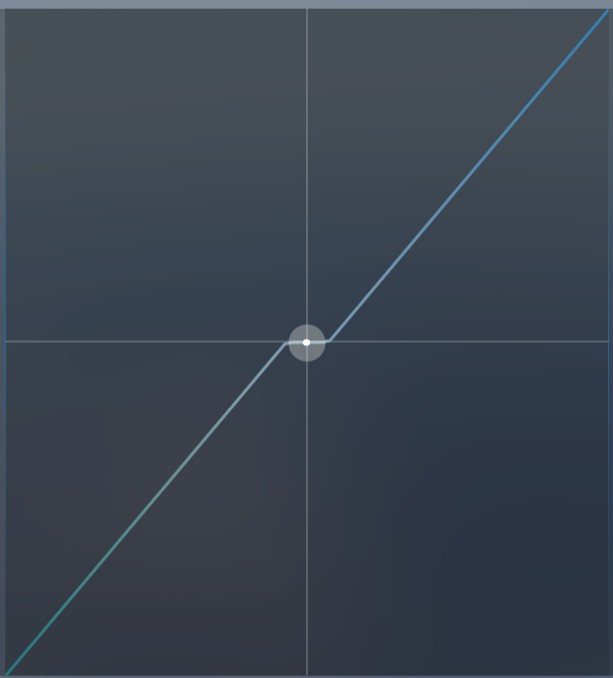
No aircraft-specific bindings are required to control the Rafale in pitch, roll, or yaw. You can use the standard simulator axis assignments: AILERONS AXIS, ELEVATOR AXIS and RUDDER AXIS.
Depending on your controller and personal preferences, you may adjust the sensitivity, dead zones, and response curves in the simulator controls options.
There is no universal recommended curve, as the ideal settings depend on the travel, precision, and centering mechanism of your hardware.
Throttle
The Rafale uses a single combined throttle lever.
In order to command the mono-throttle with your physical controller, you need to bind THROTTLE AXIS or THROTTLE 1 AXIS. Throttle 2 axis is ignored.
If you are using buttons instead of an axis, you should use THROTTLE INCREASE and THROTTLE DECREASE events.
By default, the full axis range is used for dry power, and you have to bind TOGGLE AFTERBURNER event to use the afterburner range.
If you want to use the axis for dry & afterburner without afterburner toggling, you can change mode from the tablet.
See EFB section to switch between the two modes.
Bindings
The aircraft provides assignable simulator commands for its main systems and HOTAS functions.
These bindings can be configured from the Controls Options menu in the simulator, in the same way as standard aircraft commands.
Some bindings correspond directly to controls located on the real aircraft's throttle and stick. Their associated functions are described in the HOTAS section.
Some of these binding names may seem unrelated to their function in the Rafale (for example, TOGGLE PLASMA) because existing simulator events have been repurposed for aircraft-specific functions. Developers cannot create new binding names in the simulator's control settings.
We recommend creating a dedicated control profile for the Rafale and assigning these events to your controllers.
| K: Event | Binding name (english menu) | Description | HOTAS |
|---|---|---|---|
PROPELLER_REVERSE_THRUST_TOGGLE | TOGGLE PROPELLER REVERSE THRUST | Target designation (A/A or A/S) | MG4 |
TOGGLE_PROPELLER_SYNC | TOGGLE PROPELLER SYNC | Change combat mode: IDF, MIR, MIF, GUN, etc. | MG6 |
SPOILERS_TOGGLE | TOGGLE SPOILERS | Toggle spoilers | MG7 |
AP_MACH_HOLD | TOGGLE AUTOPILOT MACH HOLD | Toggle autothrottle | MG8 |
TOGGLE_PROPELLER_DEICE | TOGGLE PROPELLER DEICE | Flares salvo | MG9 |
PLASMA_TOGGLE | TOGGLE PLASMA | HUD drift cut-out | MG11 |
ATTITUDE_BARS_POSITION_DOWN | DECREASE ATTITUDE BARS POSITION | Zoom down center display | MGP3 (down) |
ATTITUDE_BARS_POSITION_UP | INCREASE ATTITUDE BARS POSITION | Zoom up center display | MGP3 (up) |
PROP_PITCH1_HI_EX1 | PROPELLER 1 PITCH HI | Create a MRK point in database | MGP4 |
PROP_PITCH4_DECREASE_EX1 | DECREASE PROPELLER 4 PITCH | Taxi light on | MGP10 (down) |
PROP_PITCH1_DECREASE_EX1 | DECREASE PROPELLER 1 PITCH | Landing/taxi/police lights off | MGP10 (left) |
PROP_PITCH2_DECREASE_EX1 | DECREASE PROPELLER 2 PITCH | Police light on | MGP10 (right) |
PROP_PITCH3_DECREASE_EX1 | DECREASE PROPELLER 3 PITCH | Landing light on | MGP10 (up) |
WAR_EMERGENCY_POWER | WAR EMERGENCY POWER | Weapon fire | PM1 |
ELEV_TRIM_DN | ELEVATOR TRIM DOWN (NOSE DOWN) | Autopilot pitch decrease / Pitch trim down | PM3 (up) |
ELEV_TRIM_UP | ELEVATOR TRIM UP (NOSE UP) | Autopilot pitch increase / Pitch trim up | PM3 (down) |
AILERON_TRIM_LEFT | AILERON TRIM LEFT | Autopilot bank left / Roll trim left | PM3 (left) |
AILERON_TRIM_RIGHT | AILERON TRIM RIGHT | Autopilot bank right / Roll trim right | PM3 (right) |
STEERING_INC | INCREASE STEERING | Toggle nose wheel steering (ground) Enable autopilot (flight) | PM8 |
STEERING_DEC | DECREASE STEERING | Disable autopilot | PM9 |
PROP_PITCH1_INCREASE_EX1 | INCREASE PROPELLER 1 PITCH | Display system page on LLD | PM10 (center) |
PROP_PITCH2_INCREASE_EX1 | INCREASE PROPELLER 2 PITCH | Display DAS selection in LLD | PM10 (left) |
PROP_PITCH3_INCREASE_EX1 | INCREASE PROPELLER 3 PITCH | Display DAS selection in RLD | PM10 (right) |
PROP_PITCH4_INCREASE_EX1 | INCREASE PROPELLER 4 PITCH | Display primary mode page in LLD | PM10 (up) |
PROPELLER_REVERSE_THRUST_HOLD | HOLD PROPELLER REVERSE THRUST | Display autopilot page on LLD | PM11 |
HORN_TRIGGER | TRIGGER HORN | Emergency stores jettison | |
SMOKE_OFF | SMOKE OFF | Disable smoke (Smokewinders) | |
SMOKE_ON | SMOKE ON | Enable smoke (Smokewinders) | |
SMOKE_TOGGLE | SMOKE TOGGLE | Toggle smoke (Smokewinders) | |
TOGGLE_FEATHER_SWITCH_1 | TOGGLE FEATHER SWITCH 1 | Display custom weapon camera (depending on active mode) | |
TOGGLE_FEATHER_SWITCH_2 | TOGGLE FEATHER SWITCH 2 | Display custom target camera (depending on active mode) | |
TOGGLE_FEATHER_SWITCH_3 | TOGGLE FEATHER SWITCH 3 | Switch between fired weapons with custom weapon camera |
If you fly using Thrustmaster® HOTAS WARTHOG, you may have unwanted APU start because of default bindings. Please go in controls options in order to remove all bindings related to APU.
Custom variables and events
Advanced controller software such as FSUIPC or SPAD.neXt can directly trigger custom variables (L:) or events (H:).
They provide access to more cockpit controls and functions.
| Variable or event | Description |
|---|---|
H:AZP_RAF_AIR_CONDITIONING_TOGGLE_PRESSED | Toggle ECS and start APU if necessary |
H:AZP_RAF_ALARMS_ACKNOWLEDGE | Acknowledge active alarms |
H:AZP_RAF_AP_ALT_VAR_INC | Increase autopilot target altitude |
H:AZP_RAF_AP_ALT_VAR_DEC | Decrease autopilot target altitude |
H:AZP_RAF_AP_AT_TOGGLE | Toggle autothrottle |
H:AZP_RAF_AP_MAIN_MODE_TOGGLE | Toggle autopilot |
H:AZP_RAF_AP_TF_TOGGLE | Toggle terrain following |
L:AZP_RAF_AVIONICS_MF_KNOB_MODE | Set multi-function knob (MFK) position: 0: R1 1: R2 2: H 3: BULL 4: BINGO 5: DEST 6: ALT |
H:AZP_RAF_AVIONICS_MF_KNOB_INC | Rotate MFK (clockwise) |
H:AZP_RAF_AVIONICS_MF_KNOB_DEC | Rotate MFK (counterclockwise) |
H:AZP_RAF_AVIONICS_MF_KNOB_PUSHED | Push MFK |
H:AZP_RAF_AVIONICS_VISUALISATION_KNOB_LEFT_INC | Rotate left visualization knob (clockwise) |
H:AZP_RAF_AVIONICS_VISUALISATION_KNOB_LEFT_DEC | Rotate left visualization knob (counterclockwise) |
H:AZP_RAF_AVIONICS_VISUALISATION_KNOB_LEFT_PUSHED | Click on left visualization knob |
H:AZP_RAF_AVIONICS_VISUALISATION_KNOB_RIGHT_INC | Rotate right visualization knob (clockwise) |
H:AZP_RAF_AVIONICS_VISUALISATION_KNOB_RIGHT_DEC | Rotate right visualization knob (counterclockwise) |
H:AZP_RAF_AVIONICS_VISUALISATION_KNOB_RIGHT_PUSHED | Push right visualization knob |
H:AZP_RAF_ELECTRICAL_MAIN_SOURCE_KNOB_DEC | Rotate 5K knob (counterclockwise) |
H:AZP_RAF_ELECTRICAL_MAIN_SOURCE_KNOB_INC | Rotate 5K knob (clockwise) |
L:AZP_RAF_ENGINE_AUXILIARY_LEVER_POS:1 | Set auxiliary engine control (AEC) position for left engine: 0: STOP 1: IDLE 2: NORM 3: FIX |
L:AZP_RAF_ENGINE_AUXILIARY_LEVER_POS:2 | Set auxiliary engine control (AEC) position for right engine (same as above) |
H:AZP_RAF_ENGINE_TGA_TOGGLE_PRESSED | Toggle APU |
H:AZP_RAF_VTLD_SWITCH_MOVED_HSI | Select HSI page on RLD |
H:AZP_RAF_VTLD_SWITCH_MOVED_FUEL | Select FUEL page on RLD |
H:AZP_RAF_VTLD_SWITCH_MOVED_ECM | Select ECM page on RLD |
H:AZP_RAF_VTLD_SWITCH_MOVED_SITAC | Select SITAC page on RLD |
H:AZP_RAF_VTLG_SWITCH_MOVED_ALARMS | Select FAIL page on LLD |
H:AZP_RAF_VTLG_SWITCH_MOVED_WEAPONS | Select WEAPONS page on LLD |
H:AZP_RAF_VTLG_SWITCH_MOVED_AUTOPILOT | Select AUTOPILOT page on LLD |
H:AZP_RAF_VTLG_SWITCH_MOVED_INFO | Select INFO on LLD |
H:AZP_RAF_WEAPONS_EMERGENCY_JETTISON_PRESSED | Emergency stores jettison |
H:AZP_RAF_WEAPONS_GUN_REFILL | Refill gun ammo |