SITAC
Description
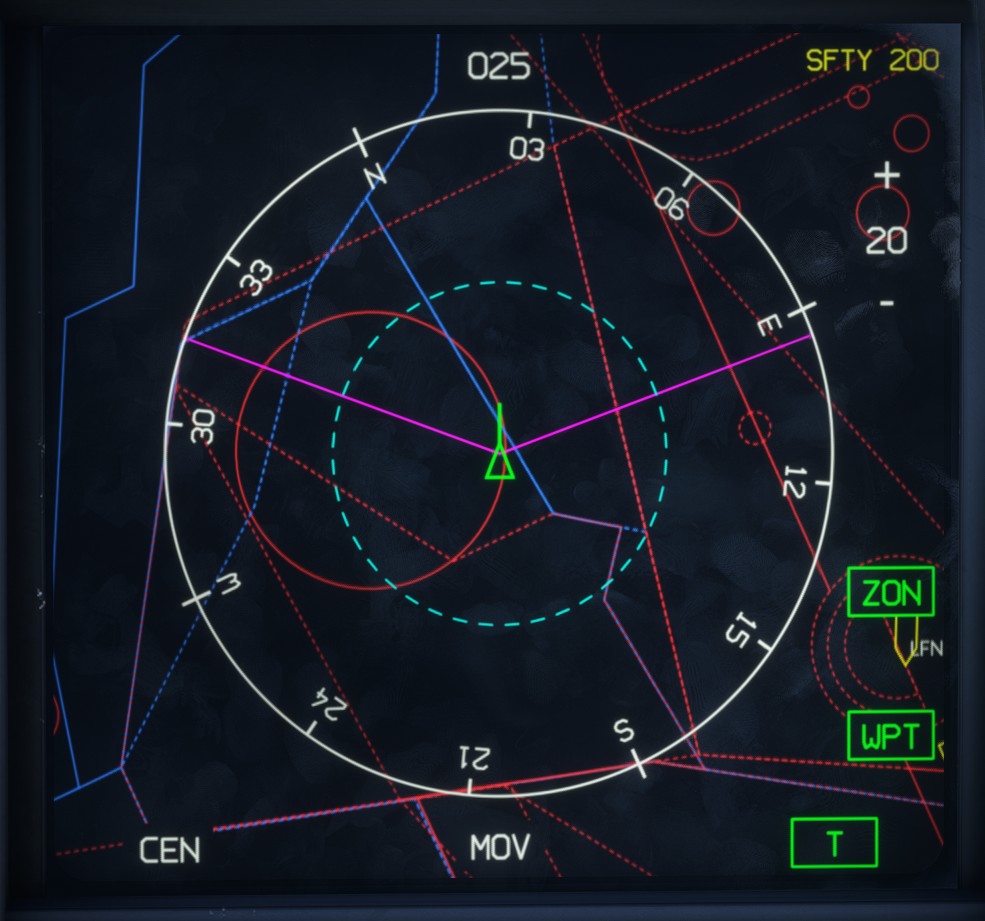
The SITAC page displays the tactical situation in a format similar to the HCD, with which it shares most of its display elements and settings.
To access it, move the RLD Page Selection Switch to the SA position.
The page can also be assigned to either lateral display from the LD DAS page.
The display is centered on a compass rose showing the current heading, using either a magnetic or true reference depending on the LD HSI setting. A blue dashed circle represents half of the selected range.
The aircraft is represented by a green symbol, together with the radar coverage sector in magenta.
The current safety height is displayed in the upper-right corner.
Other elements, including the flight plan and detected traffic, are displayed in the same way as on the HCD.
Settings
The following settings are available on the SITAC page:
-
ZON: toggles the display of airspace zones. -
WPT: toggles the flight plan display. -
CEN: toggles the centered view mode. -
MOV: activates moving-map mode. -
T: toggles between track-up and north-up orientation. -
+/-: zooms the map in or out.